
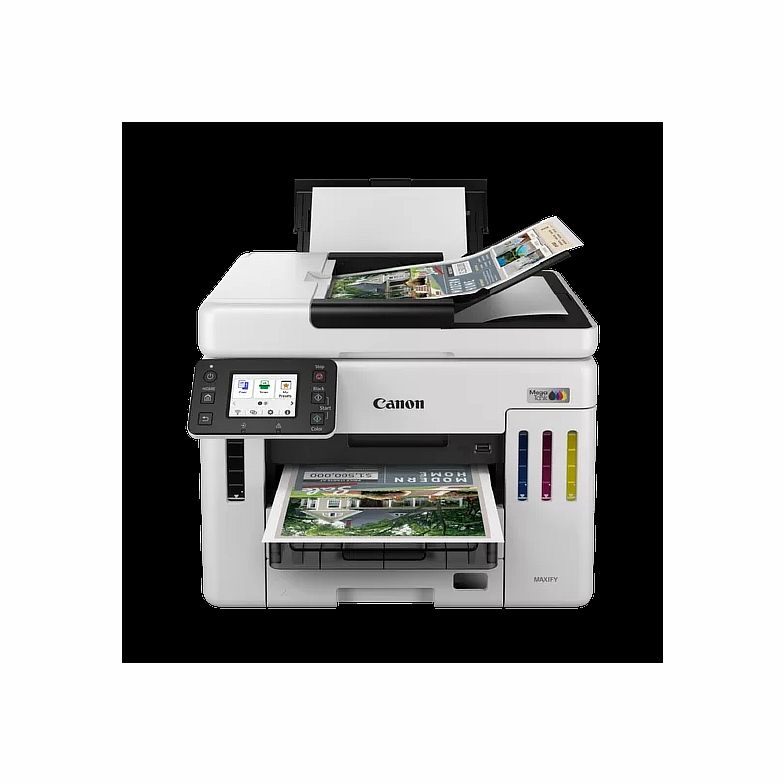
Description
Specifications in detail
General Specifications
Model Numbers
MAXIFY GX7140
Functions
Wi-Fi, Ethernet, Print, Copy, Scan, Fax & Cloud
Printer Specifications
Print Resolution
Up to 600 x 1200 dpi1
Print Margins (min.)
Top: 5mm, Bottom: 5mm, Left & Right: 5mm
Print Technology
1 Print Head
Refillable ink tank printer
Mono Print Speed
Approx. 24.0 ipm2
Colour Print Speed
Approx. 15.5 ipm3
First-Print-Out Time
Mono: 5.5 sec (ready)4
Colour: 7 sec (ready)5
Two Sided Printing
Auto Duplex Print (A4, Letter – Plain Paper (64 g/m2), Canon Red Label Superior (WOP111), Canon Oce Office Colour Paper (SAT213))
Consumables and Yields
Standard Ink Bottles
GI-46 BK
GI-46 C
GI-46 M
GI-46 Y
Maintenance Cartridge
MC-G01 (User Replaceable)
Bottle Yield (Plain Paper)
A4 colour documents printing6
Black: 6,000 pages (Economy mode 9,000 pages)7
Colour: 14,000 pages (Economy mode 21,000 pages)8
* Estimated supplemental yield
Paper Support
Paper Types
Plain Paper (64 g/m2 – 105 g/m2)
Red Label Superior 80 g/m2 (WOP111),
Canon Oce Office Colour Paper 80 g/m2 (SAT213)
Photo Paper Pro Luster (LU-101),
Photo Paper Plus Glossy II (PP-201)
Matte Photo Paper (MP-101),
Glossy Photo Paper “Everyday Use” (GP-501)
High Resolution Paper (HR-101N),
Envelope,
Photo Paper Plus Semi-gloss (SG-201),
Restickable Photo Paper (RP-101)
Magnetic Photo Paper (MG-101)
Light Fabric Iron on Transfers (LF-101),
Double sided Matte Paper (MP-101D)
Maximum Paper Input
Rear Tray: Max. 100 sheets (plain paper)
Cassette 1: Max. 250 sheets (plain paper)
Cassette 2: Max. 250 sheets (plain paper)
ADF: A4, A5, LTR: 50 Sheets, LGL: 10 Sheets
Paper Sizes
Rear Tray: A4, A5, A6, B5, LTR, LGL, 4″x6″ (10 x 15 cm), 5″x7″ (13 x 18 cm), 7″x10″ (18 x 25 cm), 8″x10″ (20 x 25 cm), Square 5″x 5″, (127mm x 127mm), Envelopes (DL, COM10), Custom size (width: 89 mm – 216 mm, length: 127 mm – 1,200 mm)
Cassette 1: A5, B5, A4, LTR
Cassette 2: A4, LTR
ADF: A4, A5, LTR, LGL
Paper Weight
Rear Tray: Plain Paper: 64 g/m2 – 105 g/m2 or supported genuine Canon papers
Canon paper: Max. paper weight Approx. 265 g/m2
(Photo Paper Plus Glossy II (PP-201))
Cassette 1: Plain Paper: 64 g/m2 – 105 g/m2
Cassette 2: Plain Paper: 64 g/m2 – 105 g/m2
Scanner Specifications
Scanner Type
D-ADF / Platen CIS colour scanner
Scan Speed
Simplex. 22.1 ipm Colour 9
Simplex. 22 1 ipm Black10
Scanner Resolution (Optical)
1,200 x 1,200 dpi11
Line Scanning Speed
Colour: 1.4 ms/line (300 dpi)
Greyscale: 1.4 ms/line (300 dpi)12
Scanning Depth (Input / Output)
Colour: RGB each 8bit
Greyscale:8 bit
Maximum Document Size
Platen: A4/Letter (216 x 297 mm)
ADF: A4/Letter/Legal (216 x 356 mm)
Copier Specifications
Copy Speed
sFCOT / Simplex (colour): Approx. 12 sec13
sESAT / Simplex (colour): Approx. 12.7 ipm14
ESAT/Simplex ADF (colour): Approx. 12.2 ipm15
ESAT/Simplex ADF (black): Approx. 22.2 ipm16
Copy Quality
3 levels (Economy, Standard, High)
Intensity Adjustment
9 levels (automatic adjustment available, AE copy)
Multiple Copy
99 copies (max.)
Copy Functions
Document Copying, Two-Sided Copy, Manual Two-Sided Copy with ADF, 2-on-1 and 4-on-1 copy, Collated Copy (ADF only), Frame erase copy (Flatbed only), ID copy
Copy Zoom
25 – 400%
Fit to page
A5 to A4, B5 to A4, A4 to A5 and A4 to B5
Fax Specifications
Fax Type
Super G3 / Colour
Fax Resolution
Mono: 8pels/mm x 3.85 lines/mm (Standard)
8pels/mm x 7.7 lines/mm (Fine)
300 dpi x 300 dpi (Extra Fine)
Colour: 200 x 200 dpi
Fax Speed
Mono: Approx. 3 sec.17
Colour: Approx. 1 min.18
Modem Speed
maximum 33.6 kbps (Automatic fall back)
Fax Memory
Approx. 250 pages19
Automatic Dialing
Coded Speed Dialing: Max. 100 locations
Group Dialing: Max. 99 locations
Interface
Display Type & Size
2.7″ / 6.9cm LCD (Touch Screen, Color)
Display Languages
33 Languages Selectable: Japanese, English (mm & inch), German, French, Italian, Spanish, Portuguese, Dutch, Danish, Norwegian, Swedish, Finnish, Russian, Ukrainian, Polish, Czech, Slovenian, Hungarian, Slovakian, Croatian, Romanian, Bulgarian, Turkey, Greek, Estonian, Latvian, Lithuanian, Simplified Chinese, Korean, Traditional Chinese, Thai, Indonesia, Vietnamese
Connectivity
Wired LAN
Communication Protocol: SNMP / HTTP / TCP/IP (IPv4/IPv6)
TLS 1.3/1.2/1.1/1.0
Supported Standards: IEEE802.3u (100BASE-TX) / IEEE802.3 (10BASE-T)
Transfer Speed: 10Mbps/100Mbps (Auto switching)
Security: IEEE 802.1X(EAP-TLS/EAP-TTLS/PEAP)
Wireless LAN
Communication Protocol: SNMP/ HTTP/TCP/IP (IPv4/IPv6)
Supported Standards: IEEE802.11n/IEEE802.11g/IEEE802.11b/IEEE802.11a//IEEE802.11ac20
Frequency Bandwidth: 2.4GHz
Range: Indoor 50 m ?depends on the transmission speed and conditions
Security: WPA-PSK(AES)
WPA2-PSK(AES)
WPA3-SAE(AES)
WPA-EAP(AES)*
WPA2-EAP(AES)*
WPA3-EAP(AES)*
* IEEE802.1X(EAP-TLS/EAP-TTLS/PEAP) available
Interface
Hi-Speed USB (B Port)
Mobile Apps
Canon PRINT app21
Easy-PhotoPrint Editor app22
Printer Features
Cloud Link (print)23
Canon Print Service Plugin (Android)24
Apple AirPrint
Wireless Direct
Mopria (Android)25
Smart Assistant & Automation Support
Amazon Alexa™26
Software
Supported Operating Systems
Windows 11?Windows 10?Windows 8.1?Windows 7 SP1
Operation can only be guaranteed on a PC with pre-installed operating system.
Printer Driver and IJ Printer Assistant Tool support the following OS: Windows Server 2008 R2 SP1?Windows Server 2012 R2?Windows Server 2016?Windows Server 2019, Windows Server 2022 and Windows Server 2025.
Display environment: XGA 1024 x 768 or more
Mac:macOS Big Sur 11.7.6 – macOS Sequoia 15
Mobile Operating Systems: iOS®, iPadOS, Android™, Chrome OS27
Minimum System Requirements
Windows: 1.5GB or more
Note: for bundled software installation. The necessary amount of hard disk space required
Software Included
Printer Driver
IJ Printer Assistant Tool
Easy-PhotoPrint Editor (download)28
Easy-Layout Editor (download)
Wi-Fi Connection Assistant (download)
Quick Utility Toolbox (download)
PosterArtist Lite (Windows only – download)
Physical Features
Weight
Approx. 13.1 kg
Dimensions (W x D x H)
Approx. 399 x 410 x 314 mm (With the trays retracted)
Approx. 399 x 645 x 387 mm (With the trays extended)
Acoustic Noise Levels
Approx. 49.0dB (A)29
Recommended Operating Environment
5-35°C 10-90%RH (no dew condensation)
Power Source
AC 100-240V, 50/60Hz
Duty Cycle
Up to 45,000 pages
Power Consumption
Copying: Approx. 21 W30
Off: Approx. 0.06 W
Standby (USB connection to PC): Approx. 0.9W
Standby (all ports connected): Approx. 1.5W
Time to enter Standby mode*: 5minutes 3sec
*The wait time for standby cannot be changed (For ErP Lot 26 regulation)
Typical Electricity Consumption
0.165 kWh31
Ink droplets can be placed with a pitch of 1/600 inch at minimum.
Document print speeds are the averages of ESAT (Word, Excel, PDF) in Office Category Test for the default simplex mode, ISO/IEC 24734. Print speed may vary depending on system configuration, interface, software, document complexity, print mode, page coverage, type of paper used etc.
Document print speeds are the averages of ESAT (Word, Excel, PDF) in Office Category Test for the default simplex mode, ISO/IEC 24734. Print speed may vary depending on system configuration, interface, software, document complexity, print mode, page coverage, type of paper used etc.
Document print speeds are the averages of FPOT in Office Category Test for the default simplex mode, ISO/IEC17629.
Print speed may vary depending on system configuration, interface, software, document complexity, print mode, page coverage, type of paper used etc.
Document print speeds are the averages of FPOT in Office Category Test for the default simplex mode, ISO/IEC17629.
Print speed may vary depending on system configuration, interface, software, document complexity, print mode, page coverage, type of paper used etc.
Page Yield is the estimated value based on Canon individual test method using the ISO/IEC 24712 chart and continuous printing simulation with the replacement after initial setup.
The economy mode reduces the ink consumption by lowering the density, 50% more pages than the standard mode can be printed
The economy mode reduces the ink consumption by lowering the density, 50% more pages than the standard mode can be printed
ADF scan speeds are the average of scESAT30secA in “ADF Productivitiy Measurement” test, ISO/IEC 17991:2015. When scanning or copying a certain volume of documents (approx. 150 sheets in default settings) continuously from the ADF, the printer may switch to “waiting mode” in which paper feeding stops for several tens of seconds after each scan to prohibit overheating the ADF.
ADF scan speeds are the average of scESAT30secA in “ADF Productivitiy Measurement” test, ISO/IEC 17991:2015. When scanning or copying a certain volume of documents (approx. 150 sheets in default settings) continuously from the ADF, the printer may switch to “waiting mode” in which paper feeding stops for several tens of seconds after each scan to prohibit overheating the ADF.
Optical resolution is a measure of maximum hardware sampling resolution, based on ISO 14473 standard.
*Optical resolution scan is available, only when you use TWAIN Driver.
The fastest speed in Hi-Speed USB on Windows PC. Transfer time to computer is not included.
Copy speeds are the average of sFCOT and sESAT, ISO/IEC 29183. Copy speeds (ADF) are ESAT of copy in sequence, ISO/IEC24735. Copy speed may vary depending on document complexity, copy mode, page coverage, type of paper used etc. and does not take into account warming up time.
Copy speeds are the average of sFCOT and sESAT, ISO/IEC 29183. Copy speeds (ADF) are ESAT of copy in sequence, ISO/IEC24735. Copy speed may vary depending on document complexity, copy mode, page coverage, type of paper used etc. and does not take into account warming up time.
Copy speeds are the average of sFCOT and sESAT, ISO/IEC 29183. Copy speeds (ADF) are ESAT of copy in sequence, ISO/IEC24735. Copy speed may vary depending on document complexity, copy mode, page coverage, type of paper used etc. and does not take into account warming up time.
Copy speeds are the average of sFCOT and sESAT, ISO/IEC 29183. Copy speeds (ADF) are ESAT of copy in sequence, ISO/IEC24735. Copy speed may vary depending on document complexity, copy mode, page coverage, type of paper used etc. and does not take into account warming up time.
Black & white document fax transmission speed is based on default setting using ITU-T No.1 chart. Color document fax transmission speed is based on default setting using Canon Color Fax Test Sheet. Actual transmission speed may vary depending on document complexity, fax settings at receiving end, and line conditions etc.
Black & white document fax transmission speed is based on default setting using ITU-T No.1 chart. Color document fax transmission speed is based on default setting using [Canon Color Fax Test Sheet. Actual transmission speed may vary depending on document complexity, fax settings at receiving end, and line conditions etc.
Page count is based on ITU-T No.1 chart or Canon FAX Standard Chart No.1.
Wireless printing requires a working network with wireless 802.11b/g/n capability, operating at 2.4GHz. Wireless performance may vary based on terrain and distance between the printer and wireless network clients.
Requires an Internet connection and the Canon PRINT app, available for free on the App Store and at Google Play. Compatible with iOS, iPadOS devices running iOS 16 or later, and Android mobile devices running Android 7 or later. Your device must be connected to the same working network with wireless 802.11 b/g/n/a/ac capability as your printer.
The Easy-PhotoPrint Editor mobile application requires an Internet connection and the Easy-PhotoPrint Editor app v1.9.0, available for free on the App Store and at Google Play. Compatible with iOS and iPadOS devices running iOS 15 or later, and Android mobile devices running Android 7 or later. Certain exceptions may apply.
Requires an Internet connection. Can be accessed from the Operation Panel or Canon PRINT app.The Canon PRINT app is available for free on the App Store and at Google Play. Compatible with iOS, iPadOS devices running iOS 16 or later, and Android mobile devices running Android 7 or later. Your device must be connected to the same working network with wireless 802.11 b/g/n/a/ac capability as your printer. Requires a compatible social media account and is subject to that social media accounts Terms of Service. Certain exceptions may apply.
Canon Print Service is a print plug-in for Android smart devices, which enables printing from Android 7 onwards devices to many Canon printers via a Wi-Fi network. The plug-in does not work as a standalone app. Available for free at Google Play.
Requires Android mobile device with Android 4.4 operating system or later with the Mopria Print Service pre-loaded with that device and the compatible PIXMA printer on the same wireless network. The Mopria experience is also available on Android 4.4 mobile devices with a download of the Mopria Print Service from Google Play.
Requires an active smart assistant account linked and accompanying app enabled, the smart device and printer to be actively connected with permission to the Canon Inkjet Cloud Printing Center, and the required action(s), skill(s), or applet(s) available/enabled to the compatible printer. Voice commands can not be displayed as text on Amazon smart devices with screens. Only English, French and German supported.
Some functions may not be available with these Operating Systems. Please refer to the manual or website for details.
The Easy-PhotoPrint Editor software requires an Internet connection. The Easy-PhotoPrint Editor software v1.9.0 is compatible with the following operating systems; Microsoft Windows 11 (64-bit), Windows 10 (64-bit/32-bit), macOS High Sierra v10.13 onwards. Minimum Windows and macOS/Mac OS X requirements are: 2GB of RAM and a monitor with 1024×768 resolution.
Plain Paper (A4, B/W). Acoustic Noise is measured based on ISO7779 standard.
Copy: When copying ISO/JIS-SCID N2 (printed by inkjet printer) on A4 size plain paper using default settings.
Typical Electricity Consumption (TEC) value: TEC value was calculated assuming the unit will be constantly switched among operational mode, sleep mode, and power-off mode for 5 days, and that it will be either in sleep or power-off mode for the remaining 2 days within the same week. The TEC value of this product is calculated by Canon on their own accord using TEC measurement procedure regulated in International ENERGY STAR Program.


